Phases of the Moon
- 4.0
- Rating
- 10.00M
- Installs
- Free
- Price
 Analysis by App-foxy
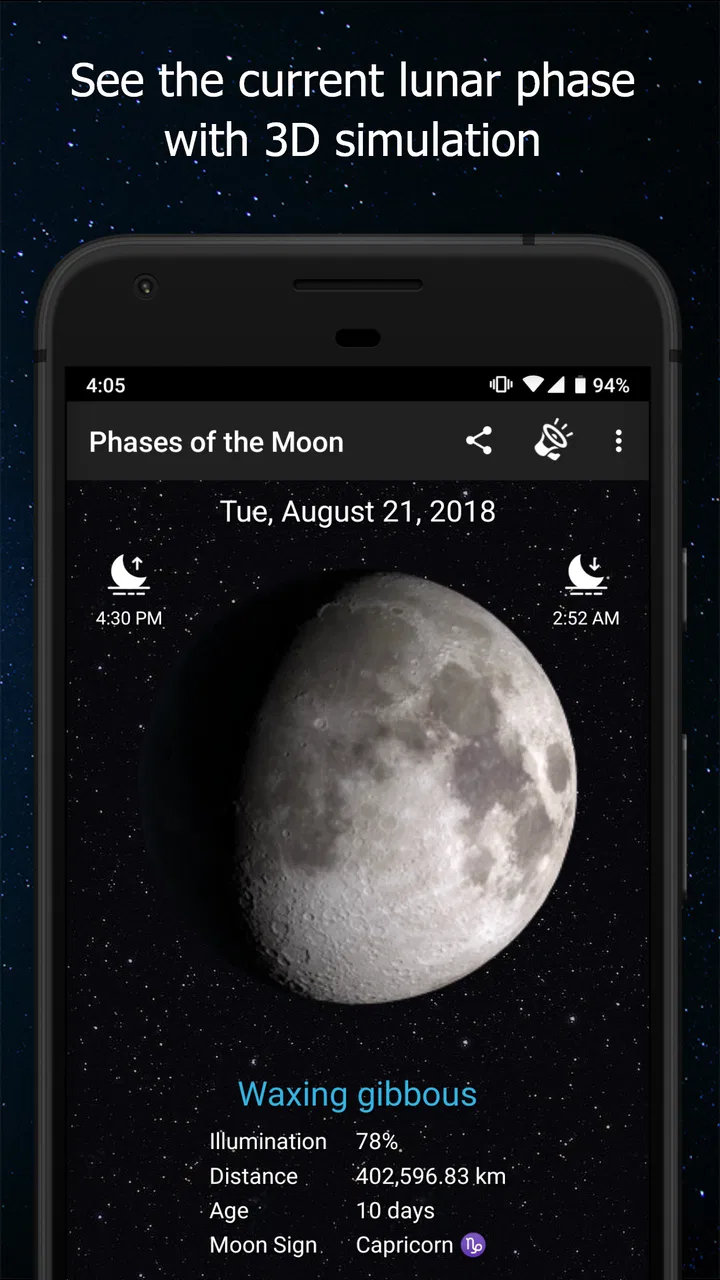
I like weather apps that answer a practical question quickly, but lunar information needs a slightly different approach. Phases of the Moon is built for people who want to follow the Moon itself: its changing appearance, upcoming lunar events, calendar information, and related almanac details. After spending time with it, I found it more focused than a standard forecast app and more useful than a simple picture of the current Moon phase.
The app is free, aimed at everyone, and developed by M2Catalyst, LLC. It has been available since November 13, 2012, and its current version is 7.7.0. That long presence matters here because lunar tracking is a habit-based activity: I do not need a new design every week, but I do want a dependable way to check what is happening tonight, tomorrow, or later in the month.
Its audience is fairly clear. If you enjoy observing the sky, planning night photography, keeping a gardening or fishing calendar, or simply understanding why the Moon looks different from one evening to the next, this app gives you a dedicated place to do it. If you only want rain forecasts, temperature alerts, or radar, it is not a replacement for your usual weather service.
You May Also Like

 Blood Strike: 2.5 Anniversary
Blood Strike’s Loadouts Turn Every Drop Into a Tactical Gamble
A close look at Blood Strike’s custom loadouts: how fast access to signature weapons reshapes its battle royale rhythm, rewards preparation, and narrows the gap between fights.

 Pandora - Music & Podcasts
Pandora’s Music Is Easy to Start, but Harder to Recover
Pandora’s strength is its low-effort path from a seed to a station. Its weak spot is how much confidence it asks you to place in connection, setup, and quiet recovery.

 8 Ball Pool
 Is Built on Rivalries, Rematches, and Routine
A close look at the rivalries, rematches, shared routines, and unanswered safety questions that turn a quick pool match into a persistent mobile community.

 Samsung Music
’s Quiet Strength Is Playing What You Already Own
Its reach comes less from spectacle than from dependable access to a personal library. That simplicity is both the app’s strongest retention engine and its ceiling.

 AccuWeather: Weather Radar
AccuWeather Review: A Quick, Clear Forecast for Everyday Decisions
For everyday plans, the best forecast is the one you can understand quickly. AccuWeather makes rain timing, radar, and local conditions easy to act on, with a few trade-offs.

 Hill Climb Racing
Why Hill Climb Racing Still Turns Crashes Into One More Run
A tiny car, a bumpy hill and one more upgrade: Hill Climb Racing keeps resurfacing because its simple chaos makes every near-miss feel personal.
More From Our News Desk
View All News


Building a useful lunar routine
I use a lunar app most effectively when I give it one small, repeatable job: help me notice the cycle and make better plans around it. A weekly check can turn scattered curiosity into a useful routine, especially if I pair a future date with a real reason to look up. From there, the next step is deciding which settings deserve a place in that routine.
The simplest way to use it each day
My baseline workflow starts with the current Moon view. I check the displayed phase, then move through the lunar calendar to see how the appearance will change. That is more useful than treating the app as a one-time reference, because the Moon is a cycle rather than a single condition. A quick daily glance helps me develop an intuition for how quickly the illuminated portion grows or shrinks.
The calendar becomes especially helpful when I am planning something in advance. Instead of opening the app only when I happen to look up, I can browse toward a future evening and see where it falls in the lunar cycle. This is a good habit for anyone arranging a night walk, an outdoor gathering, or a photography session where natural light will affect the result.
The event alerts add another layer to that routine. I would not turn on every notification immediately. I prefer to begin with the events I genuinely care about, then decide whether the reminders fit my schedule. A lunar alert is useful when it prevents me from forgetting an observation opportunity; it becomes noise when I already check the app every night.
The widget is also worth considering for repeat use. A glanceable Moon display can make the information part of my home-screen routine instead of another app I have to remember to open. I find this most valuable when I am learning the cycle. Seeing the changing phase regularly makes the calendar easier to understand, especially for someone who does not yet recognize the difference between the waxing and waning stages.
What the almanac adds
The almanac gives the app a broader role than a phase icon alone. I use it when I want context around the lunar calendar rather than just the answer to “what does the Moon look like tonight?” That makes the app feel closer to a reference tool than a decorative astronomy widget.
For beginners, the almanac can also provide a more natural starting point than trying to learn every lunar term at once. I recommend choosing one recurring question, such as when the Moon will be fuller or when a particular event is approaching, and using the calendar and almanac together. That workflow is less confusing than jumping between unrelated screens without a purpose.
There is a practical trade-off here. Lunar information is precise enough to support planning, but the app does not turn an ordinary phone into a complete observing system. It helps me understand the cycle and identify useful dates; it does not replace the experience of checking cloud cover, local visibility, or the actual horizon outside.
Settings I would check first
Before settling into regular use, I would review the notification settings and decide which Moon events deserve attention. My preference is to keep reminders selective. If I am planning photography, I may want advance notice of a relevant phase or event. If I am only casually curious, the widget and manual checks are less intrusive.
I would also check the widget after placing it, rather than assuming the default presentation is ideal. A widget should support a glance, not become a visual distraction. On a busy home screen, a compact lunar indicator is easier to live with than several separate shortcuts competing for attention.
Another worthwhile setting decision concerns the way I use the calendar. I treat it as a planning tool, not merely a record of past phases. When I know I have an outdoor activity coming up, I look ahead and note the lunar conditions before making other arrangements. This prevents a common mistake: expecting the Moon to provide a certain amount of light without checking its position in the cycle first.
Because the app runs on Android versions beginning with 7.0, it is accessible on a wide range of devices. That is useful for people keeping an older phone as a dedicated bedside or outdoor reference device. I would still keep the app updated when possible, since the current release is 7.7.0 and updates are generally preferable for compatibility and stability.
Three faster habits that improve the experience
The first shortcut is to use the widget for recognition and the full app for planning. I do not need to open the complete interface every time I want a quick reminder of the current phase. When I need an upcoming event, calendar context, or almanac information, I then move into the app itself. Separating those two jobs keeps the daily routine quick.
The second is to combine a calendar check with a real-world observation. I like looking at the app before going outside, then comparing its information with what I actually see. This is a simple way to learn the cycle and notice how local surroundings affect the experience. Buildings, trees, haze, and the Moon’s position can make an expected observation feel different from the clean information on a screen.
The third is to create a repeatable planning window. For example, I might check the coming week at the start of the weekend rather than repeatedly searching for dates. That turns the calendar into a lightweight planning habit. It is particularly handy for photographers and amateur observers who need to think about timing but do not want lunar research to become a separate project.
These habits also reveal the app’s strongest quality: it brings several related lunar tools into one workflow. A basic phase app might tell me what I am seeing now. This one encourages me to connect the current phase, future events, alerts, the widget, and the almanac. The value comes from that combination rather than from any single screen.
Where it fits beside ordinary weather apps
I would not compare this app directly with a typical weather service as though they served the same purpose. A regular weather app is better for temperature, rain, wind, warnings, and short-term outdoor decisions. Phases of the Moon is better when the Moon is the subject of the question.
For an evening hike, I might use both. The lunar app tells me what kind of Moon-related conditions to expect, while a weather app tells me whether clouds or rain will prevent me from seeing it. Using only the lunar information would be incomplete, just as using only a weather forecast would leave out the lunar timing I care about.
Compared with a simple calendar reminder, this app has a more natural connection between dates and lunar changes. A reminder can tell me to look at the Moon on a certain day, but it cannot replace a dedicated cycle view and event-focused reference. On the other hand, someone who already uses a full astronomy application may find this app intentionally narrow. That broader alternative may be better for star charts, planet identification, or detailed sky navigation.
Real situations where it earns a place
Imagine I am planning a backyard dinner and want a little natural light after sunset. I can check the lunar calendar before choosing the date, then use the widget as a quick reminder during the week. On the day itself, I would still check the local weather separately, but the lunar planning is already handled.
For night photography, the app helps with the first part of the decision: choosing a date that matches the desired Moon appearance. A bright Moon can be useful for illuminating a landscape, while a less illuminated phase may suit a darker sky. The app does not make the creative decision for me, but it gives me a repeatable way to compare dates instead of guessing.
It can also suit families and students. The changing Moon is an approachable subject, and the calendar makes it easier to connect what appears on a screen with what is visible outdoors. I would encourage using it alongside actual observation rather than treating it as a substitute for looking up. The app is most educational when it prompts a question and the sky provides the answer.
Gardeners, anglers, and people who follow traditional lunar planning may appreciate having the calendar and almanac together. I would be careful not to treat lunar timing as a guarantee of practical results. The app is useful for organizing observations and personal routines, but it should not replace sound decisions based on weather, local conditions, or professional guidance.
Limitations experienced users should understand
The focused design is both a strength and a limitation. I appreciate not having a crowded dashboard full of unrelated forecasts, but users expecting a complete astronomy suite may find the scope too narrow. There is no reason to choose this as a general sky-navigation tool when a dedicated astronomy app is what you actually need.
The app also cannot answer every question involved in seeing the Moon. A phase tells me how much of the lunar disk is illuminated, but visibility depends on more than illumination alone. Clouds, haze, local obstructions, timing, and the viewing location all matter. I use the app to plan the lunar side of an outing, then verify the real-world conditions elsewhere.
Notifications require restraint. Alerts are helpful when they support a plan, but they can make a calm reference app feel demanding if every event is enabled. I recommend starting with the smallest useful set and expanding only when a real need appears. That is a better long-term approach than accepting every reminder during setup.
The free price makes experimentation easy, and the Everyone rating means it is suitable for a broad audience. Still, “free” does not automatically mean it will be the best fit for every user. Someone who wants rich astronomical maps, detailed observing tools, or a single app covering the entire sky may be happier with a more specialized alternative, even if that means accepting a more complicated interface.
The app’s popularity gives it a reassuring level of adoption: it has passed ten million installs, with an average rating of 4.1 from around one hundred thousand ratings and roughly five thousand reviews. I see those figures as evidence that the focused concept works for many people, not as a reason to ignore personal fit. The real question is whether lunar information is something I will check repeatedly.
My verdict after making it part of a routine
My recommendation is clear: choose Phases of the Moon if you want a dedicated lunar companion, not a general weather or astronomy replacement. Its best experience comes from combining the current phase view, the calendar, carefully selected event alerts, the widget, and the almanac. Used together, those features turn a basic reference into a practical planning habit.
I especially like it for people who often ask when the Moon will look a certain way, who want reminders for lunar events, or who are beginning to observe the night sky. The interface concept is easy to understand, the app is free, and the long-running product has enough scope to remain useful after the first curious check.
I would skip it if my main need is daily forecasting, radar, severe-weather information, or advanced astronomy. In those cases, a weather service or a full sky-observation app is the more sensible choice. I would also avoid filling the phone with alerts unless I had a specific lunar routine to support.
For me, the deciding advantage is consistency. I can check the widget in seconds, open the calendar when planning ahead, and use alerts only when they solve a genuine memory problem. That combination keeps the app useful without making it feel like another noisy service. If the Moon is part of how you plan evenings, learn the sky, or choose photography dates, this is a focused and approachable app I would be comfortable recommending to a friend.
FAQs for Phases of the Moon
01What features does the Phases of the Moon app offer?
The Phases of the Moon app provides users with a detailed view of the current moon phase, a calendar of upcoming phases, and notifications for significant lunar events. It also includes educational content about the moon's impact on tides and cultural significance, making it both informative and visually appealing.
02Is the Phases of the Moon app free to download and use?
Yes, the Phases of the Moon app is free to download on both Android and iOS platforms. However, there might be optional in-app purchases available, such as ad-free versions or additional features like advanced astronomical data and personalized moon phase notifications.
03Does the app require an internet connection to function?
While the Phases of the Moon app can display basic moon phase information offline, an internet connection is required to access the most up-to-date data, receive notifications, and explore additional educational content. Offline functionality is limited to previously downloaded information and basic features.
04How accurate is the moon phase data provided by the app?
The moon phase data in the app is highly accurate, using reliable astronomical algorithms to predict lunar phases. The app regularly updates its data to ensure precision. Users can trust the information for personal planning, such as gardening by the moon or scheduling moonlit activities.
05Can the app notify me of upcoming lunar events?
Yes, the Phases of the Moon app can send notifications for upcoming lunar events, like full moons, new moons, eclipses, and supermoons. Users can customize these alerts to suit their preferences, ensuring they never miss an important celestial event.
Pros
- Realistic lunar visuals enhance user experience.
- Interactive calendar tracks moon phases easily.
- Customizable notifications for moon events.
- Educational content about lunar cycles included.
- User-friendly interface with intuitive navigation.
Cons
- Limited features in the free version.
- Occasional ads can be distracting.
- Requires internet for some features.
- No offline mode for detailed info.
- Some data updates are delayed.

Phases of the Moon
Gallery